
Create your digital guidebook with upsell store
Create my guidebook ->Welkodia works alongside Kross Booking to turn your raw reservation flow into a smooth, branded, and profitable guest arrival experience. By placing your Welkodia digital guest guidebook link inside automated pre-arrival messages in Kross Booking, your guests get immediate access to entry instructions, Wi-Fi passwords, and optional services without downloading an app.
Every professional property manager and short-term rental host experiences this operational friction. Your PMS handles the heavy lifting: synchronizing calendars across Airbnb, Booking.com, and direct booking channels, updating nightly rates, and processing guest invoices. Yet as check-in day approaches, guests keep asking the same predictable questions: "What is the door access code?", "Where can we park our car?", "Can we check in early?".
Dumping forty lines of text into an OTA message thread or sending a bulky PDF attachment does not solve the problem. Travelers moving through airports and train stations do not read lengthy messages, and PDF attachments get lost in spam or download folders. Connecting Kross Booking backend scheduling with Welkodia mobile-friendly web pages delivers the exact operational experience modern guests expect.
Quick Answer: Welkodia works alongside Kross Booking by extending your PMS backend with a mobile-first digital guest guidebook accessible without downloading any app. By placing your guidebook link in Kross Booking automated pre-arrival messages and deploying on-site QR codes, you cut arrival confusion while selling high-margin add-ons seamlessly.
Why does a PMS like Kross Booking need a dedicated guest experience layer?
A property management system (PMS) and a digital guest guidebook perform two fundamentally different operational jobs. Treating your administrative software as a guest-facing portal creates friction at the exact moment the guest arrives.
Kross Booking is a powerful cloud engine for operations: it controls Channel Manager rates, synchronizes booking availability, automates police registration lists and fiscal records, and tracks lodging revenue. However, a tired guest standing outside a locked front door with luggage does not want to log into an administrative system. They want a fast, clean web page on their phone that shows exactly how to collect keys and connect to Wi-Fi.
Here is how the two systems divide and conquer property management tasks:
| Operational Area | Kross Booking (PMS & Channel Manager) | Welkodia (Guest Experience & Ancillary Revenue) |
|---|---|---|
| Primary role | Calendar sync, channel distribution, guest billing, taxes | Interactive welcome, step-by-step arrivals, add-on sales |
| Target user | Property managers, reservation coordinators, accounting | Guests before arrival and throughout their entire stay |
| Access method | Protected management dashboards and staff logins | Instant mobile web link without passwords or app downloads |
| Arrival instructions | Plain text inserted in email templates or OTA threads | Visual entrance photos, GPS pins, keypad tutorials, parking tips |
| Ancillary services | General ledger accounting entries for extras | Interactive services store with instant Stripe card checkout |
| On-site presence | No physical hardware inside the unit | High-end QR code stands and cards on the coffee table |
Separating backend property management from the front-facing guest experience saves your team hours of customer support while providing a consistently polished hospitality standard.
How does the operational workflow between Kross Booking and Welkodia work?
Pairing Kross Booking with Welkodia does not require complex custom coding or engineering overhead. The integration uses the automated messaging and email rules already built into your Kross Booking account.
Within Kross Booking, you configure automated message triggers scheduled around the reservation date (such as immediately upon booking confirmation or 48 hours before check-in). In those templates, you add the direct URL to the Welkodia guidebook corresponding to the booked listing.
Automated journey from booking to departure
- 1Build your guidebook in Welkodia: You spend a few minutes setting up your digital guest guidebook with photo directions, Wi-Fi credentials, checkout rules, and local recommendations.
- 2Add the link in Kross Booking: In your automated email or scheduled guest message templates inside Kross Booking, insert the property guidebook link with a clear call to action.
- 3Automated delivery to the traveler: When a guest books through Airbnb, Booking.com, or your direct engine, Kross Booking automatically sends the scheduled message containing the link.
- 4Instant review and upsell purchasing: The guest taps the link on their smartphone, reviews access details, and can purchase early check-in or mid-stay cleanings with credit card checkout.
- 5On-site touchpoint with QR codes: After entering the property, the guest scans the Welkodia QR display on the table to access Wi-Fi and house instructions whenever needed.
Zero friction for your guests
Welkodia guidebooks require no app downloads from the App Store or Google Play and zero account registration. Guests click the link received via Kross Booking and the guide opens immediately in their mobile browser.
What information and services do guests find inside their Welkodia guidebook?
Many hosts mistakenly assume that a welcome guide is merely a collection of local restaurant suggestions. In reality, travelers care most about quick, definitive answers to anxiety points during travel.
When you link your Kross Booking listing to Welkodia, the guidebook centralizes all critical stay details:
- Step-by-step self check-in: Exact street address with one-tap Google Maps directions, building entry codes, floor numbers, keybox photos, and access procedures.
- One-touch Wi-Fi connection: Large-type network name display and an instant button to copy the password to the smartphone clipboard.
- Appliance and climate control guides: Clear guides for heating thermostats, air conditioning remotes, induction stoves, or washer-dryers with short tips.
- Transparent checkout expectations: Key return instructions, trash disposal locations, and checkout deadlines to ensure clean turnovers.
- Ancillary services catalog: Direct options to order late checkout, luggage storage, or extra housekeeping during longer stays.
Core rule of self check-in
Self check-in should never feel cold or detached. Providing a visual, responsive guidebook right inside your Kross Booking confirmation message reassures travelers before their trip even begins.
What role do physical Welkodia QR codes play inside each rental?
Even with perfectly automated messaging in Kross Booking, a noticeable percentage of guests do not carefully inspect their inbox prior to standing in front of the door. This is where physical on-site touchpoints become invaluable.
Welkodia creates customized, premium guest QR codes for every property (as acrylic stands, framed table displays, or magnetic signs). Positioned in the entryway or living room, the QR code serves as an intuitive anchor throughout the entire stay.
What works on the ground
- Place a clearly visible QR display in the entryway with instant Wi-Fi copy
- Let guests purchase add-on services directly from their smartphone
- Embed the Welkodia link in automated pre-stay messages inside Kross Booking
What creates operational friction
- Rely on dusty paper binders filled with outdated emergency numbers
- Force guests to turn router boxes upside down to decipher tiny password labels
- Negotiate late checkouts back and forth via text messages late in the evening
When guests scan the QR code using their smartphone camera, they open the complete digital guidebook. They connect their devices to the Wi-Fi network in seconds and explore additional services curated by your team. If you are also expanding your property management portfolio or seeking regional partners, you can explore our property managers directory map.
How to monetize add-on services using this software combination?
One of the greatest benefits of pairing a PMS like Kross Booking with Welkodia is unlocking predictable ancillary revenue.
In conventional operations, when a guest wants to drop off luggage or enter the property early, they send an open-ended message. The property manager must check cleaning schedules, negotiate a price, and coordinate cash on arrival or manual bank transfers. In most cases, managers simply grant the request for free just to avoid administrative hassle, forfeiting significant revenue.
With the Welkodia services store, you define your paid extras with fixed rules:
- Early check-in: Unlocked based on your housekeeping calendar and turnover schedule.
- Late checkout: Option to extend stay until 1:00 PM or 2:00 PM for a defined flat fee.
- Mid-stay cleaning with fresh linens: Highly attractive for corporate travelers and longer vacations.
- Reserved parking access: Monetization of allocated private parking bays.
Guests order and pay directly by credit card via Stripe. Funds deposit straight into your management bank account without cash handling or manual receipts.
Furthermore, if you want to turn these happy guests into repeat direct bookings, the Welkodia guidebook includes a dedicated module for direct rebooking without OTA commissions. You effectively turn OTA traffic routed through Kross Booking into loyal direct clients.
Maximizing stay order value
Travelers booking on short-term rental channels are accustomed to paying for added flexibility and comfort. Packaging these options in your digital guidebook converts casual questions into reliable profit.
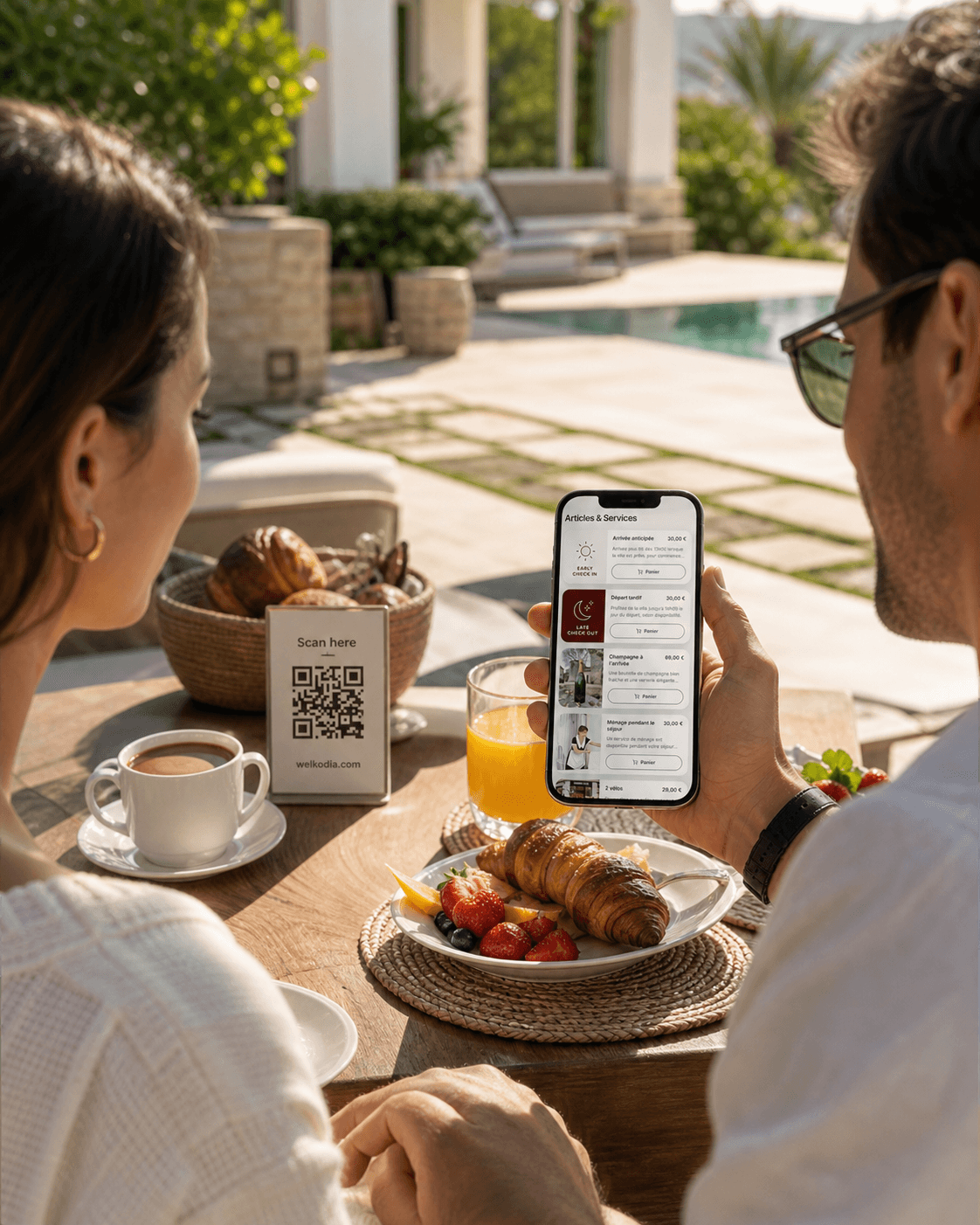
Be different from other hosts, delight your guests and unlock a new revenue stream.
Centralize arrival details, Wi-Fi, rules, recommendations, and services in one mobile-friendly guide.
How to configure the link between Kross Booking messages and Welkodia?
Setting up the connection requires only a few minutes per rental. Here is the operational checklist to link both tools:
- 1.Copy your guidebook URL: In your Welkodia dashboard, copy the public link for your property (such as
/guidebook/cozy-loft-florence). - 2.Open automated message settings in Kross Booking: Navigate to the email and messaging automation section of your Kross Booking account.
- 3.Embed the link with clear guidance: Insert a friendly call to action in your pre-arrival template, for example: « To prepare for your arrival and access essential house details (directions, Wi-Fi code, and available services), please open our digital guest guidebook: [Welkodia Link] ».
- 4.Schedule automated delivery: Set the rule to trigger 2 days or 24 hours prior to the check-in time recorded in Kross Booking.
- 5.Place the QR display in the apartment: Print or position your physical Welkodia display inside the home to welcome guests the moment they walk in.
With this setup active, every reservation confirmed in Kross Booking automatically triggers a modern, friction-free arrival journey.
FAQ
Do guests need to download an app to access the Welkodia guidebook?
No. Welkodia is a progressive mobile web app that opens immediately in any smartphone browser (Safari, Chrome) when the guest taps the link or scans the QR code. There is no password requirement or app download needed.
How is the Welkodia link delivered through Kross Booking?
You place your property guidebook URL into Kross Booking automated messaging templates (emails, SMS, or OTA inbox automations for Airbnb and Booking.com). Kross Booking delivers the message based on your scheduling rules.
What types of hospitality businesses can use Kross Booking with Welkodia?
This combination fits independent property management companies handling multiple properties, boutique hotels, bed and breakfasts, and vacation home operators who rely on Kross Booking for multi-channel calendar control.
How are payments for add-on services handled in the guidebook?
All transactions initiated through the Welkodia services store are processed securely through Stripe. Payments deposit directly into your business bank account with full order tracking.
What happens if a guest forgets to read their pre-arrival email?
That is why the on-site physical QR code is so effective. As soon as the guest steps into the living room, they scan the display on the table to access Wi-Fi, property guidelines, and local recommendations.
How does this combination encourage repeat direct bookings?
Welkodia guidebooks include a native direct rebooking feature. Satisfied guests can request their next stay directly with your management company, bypassing third-party OTA booking fees while keeping your calendars organized.
Mental model -> The PMS runs backend reservations; the digital guidebook shapes the actual in-stay guest experience.